
Beat Live: Show Music Game
MobiOneGame GlobalMusic
4.378.00 Reviews
- Version
- 34
- Installs
- 5.00M
- Age Rating
- Everyone
Screenshots
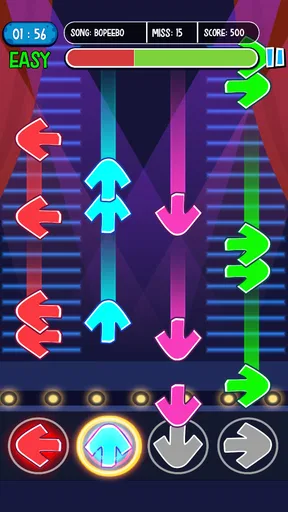
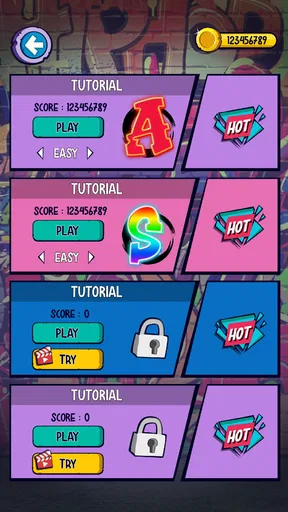
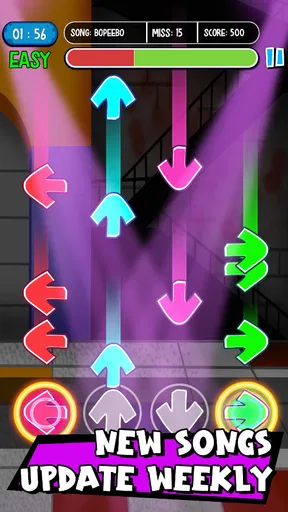
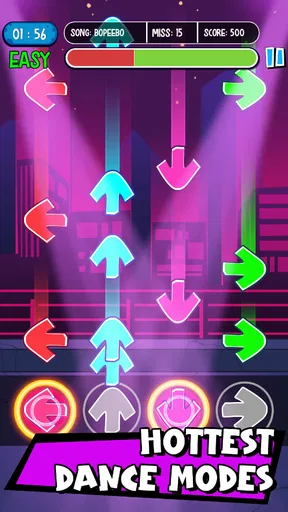
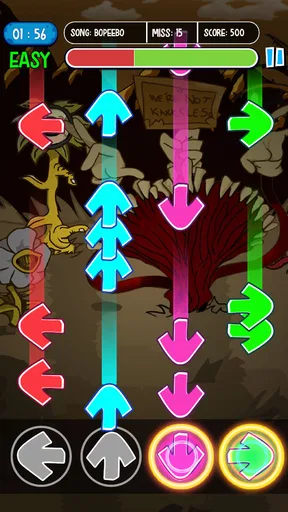
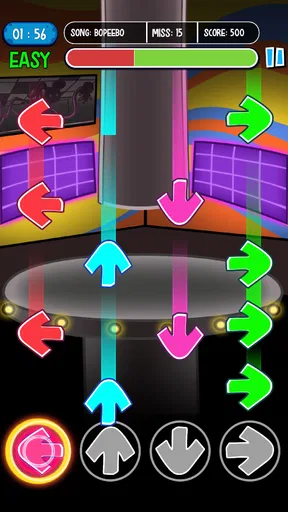
Our Review of Beat Live: Show Music Game
 Analysis by Appyee
I went into Beat Live: Show Music Game expecting a quick rhythm distraction, and that is exactly where it makes the most sense. You tap along with the music, try to keep your timing under control, and chase the satisfying feeling of finishing a performance without losing the beat. It is a simple idea, but the appeal comes from how quickly the game gets me from opening the app to making another attempt.
This is a free music game from MobiOneGame Global, aimed at Everyone and available for Android devices running version 8.0 or later. Its store summary promises an energetic live music show, but I think the more useful way to understand it is as a short-session rhythm game: action happens immediately, feedback arrives while the track is playing, and the result gives me a reason either to move on or try again.
The game has built a sizeable audience, with over five million installs and an average rating of 4.3 from around four thousand ratings. Those figures do not make it automatically perfect, but they do suggest that its straightforward format works for many casual players. I can see why: it does not ask me to learn a complicated rule set before the music starts.
How the Beat Live loop feels in practice
I find the loop easiest to enjoy when I treat each run as a quick timing check rather than a score chase: I can notice one point where my attention slipped and carry that observation into the next attempt. That also helps me tell the difference between a useful replay and simply tapping on autopilot. Before deciding whether the game suits your routine, it is worth looking at the small setup checks that can make those first sessions feel less frustrating.
The first action is easy to understand
The most important strength is the short distance between launching the game and doing something. I do not need to study a long tutorial or plan a character build before playing. The focus is the performance itself, and the central task is keeping my actions aligned with the rhythm.
That simplicity makes the game approachable for somebody who normally avoids rhythm titles. A friend can pick it up, watch what is happening on screen, and understand the goal through play rather than explanation. It also suits those moments when I have only a few minutes, such as waiting for a coffee or taking a break between errands.
At the same time, easy entry should not be confused with effortless play. The first attempt can feel forgiving because I am still learning the visual timing, but repeated sessions expose small mistakes quickly. I sometimes react to the music instead of the on-screen cue, which is not always the same thing. A song can feel fast or dramatic while the useful input arrives at a slightly different moment.
My practical advice is to watch the game’s visual signals first and treat the soundtrack as support rather than the only guide. This is especially helpful when the music is unfamiliar. Once I stop trying to tap based purely on what my ears expect, my performance becomes more consistent.
Feedback turns tapping into a performance
The game’s feedback is what gives the basic action its energy. When my timing is right, the performance feels connected; when I miss, the interruption is immediately noticeable. That instant relationship between input and result is more important here than any elaborate menu or collection system.
I like that the feedback makes mistakes useful. A failed moment is not just a bad score in the background. It tells me whether I was rushing, hesitating, or losing concentration during a busier part of the track. After a few attempts, I naturally begin to identify the sections where my attention drops.
This creates a small but genuine learning curve. I am not mastering an instrument, and the game should not be treated as music training, but it does reward visual attention and steady reactions. Players who enjoy improving through repetition will find more here than somebody who only wants to watch a performance unfold.
There is also a trade-off in the presentation. A lively stage atmosphere can make successful actions feel more exciting, but visual movement may compete with the timing cues. When I am struggling, I focus on the playable signals and ignore decorative motion. That simple adjustment is more effective than tapping harder or trying to follow every part of the screen.
Why another attempt starts so easily
The reward is not limited to reaching the end of a track. There is a small emotional payoff in recovering from a mistake, protecting a good run, and seeing whether the next attempt feels cleaner. That is why the game can turn a single spare minute into several rounds without demanding a major commitment.
For me, the strongest reward is improvement that I can feel immediately. If I miss a sequence on the first try and handle it better on the second, the game has already given me a reason to continue. This is a more personal reward than simply unlocking something, because it comes from correcting my own timing.
Players should also understand what kind of motivation they are getting. This is not the best choice if I want a deep music library, a serious competitive ranking experience, or detailed control over song selection and performance style. Its appeal is the compact loop, not a large simulation of being a professional performer.
The free entry point helps the game work as a casual download. In-app purchases are listed at $1.99 per item, so I would approach them as optional extras rather than part of the basic reason to install it. Anyone who dislikes spending inside games should decide in advance to play only with the free experience and avoid impulse purchases during a particularly exciting run.
The reset is part of the design
When a session ends, the reset is quick enough that failure rarely feels final. I can think about what went wrong, start again, and test one small change in my approach. That matters because rhythm games lose their appeal when restarting becomes a chore.
I usually reset in one of three ways. If I made an early mistake because I was not paying attention, I immediately replay. If I struggled later in the performance, I take a short pause and return with the visual cues in mind. If I finished comfortably, I continue because I want to see whether the next challenge exposes a weakness.
This makes the game useful in different everyday situations. On a short commute, I can play one or two attempts without needing to remember a complicated storyline. During a longer break, I can repeat a section of play until my timing improves. At home, it can work as a light warm-up before a more demanding game, particularly when I want something active but not mentally heavy.
The downside is that the same quick reset can make the experience feel repetitive if I am not motivated by improvement. If every attempt feels interchangeable, the loop may lose its pull. I would not recommend it to somebody who needs a strong narrative, detailed customization, or a constantly changing strategic problem to stay interested.
Where it fits among music games
Compared with a traditional rhythm game built around a large song catalog and complex note patterns, Beat Live is easier to approach but less ambitious. I can start playing without investing much time, yet players looking for deep mastery may eventually want more variety or more demanding systems.
Compared with an ordinary casual game, it has a clearer sense of timing and personal improvement. I am not just waiting for random rewards or clearing passive tasks. My input directly affects how the performance feels, which gives each round a stronger sense of responsibility.
It also differs from music-streaming apps because the music is not the whole point. I am interacting with the rhythm rather than simply listening in the background. That makes it a poor replacement for a playlist, but a good choice when I want the soundtrack to keep my hands and attention involved.
For younger players, the Everyone content rating makes the game easier to consider as a family-friendly casual option. I would still supervise spending on a shared device, since the game includes in-app purchases. For adults, the same rating means the experience is approachable, though it may not provide the intensity that dedicated rhythm fans expect.
Small habits that improve the experience
Use the first attempt as calibration, not a test of skill. I pay attention to how the cues move and where my eyes naturally go before worrying about a perfect performance. This prevents me from overreacting to early mistakes and helps me build a repeatable visual rhythm.
Keep the phone stable when timing becomes difficult. A moving device makes quick actions feel less reliable, especially when I am playing while standing or walking. Resting it against something for a short session gives me a clearer view and makes the feedback easier to interpret.
Change one habit after each failed run. If I try to fix everything at once, I cannot tell what helped. I might concentrate on earlier inputs, reduce rushed taps, or stop watching the decorative stage effects. This turns repetition into a small experiment instead of mindless restarting.
Use short sessions deliberately. The game is at its best when I stop before the loop becomes tiring. A few focused attempts leave me wanting another round later, while playing automatically for too long can make the same music and cues feel flat.
These are not complicated techniques, but they reveal the game’s real character. It rewards attention more than planning, and it gives back what I put into the timing. That is a worthwhile distinction for anyone choosing between a rhythm game and a more passive casual title.
Who should play it, and who should skip it
I would recommend it to someone who wants a free, accessible music game for brief sessions. It is especially suitable for players who enjoy repeating a challenge to improve their timing, or for friends who want something that can be understood quickly without a long explanation.
It is also a reasonable option for a player using an older Android device, since the minimum requirement is Android 8.0. The current version is 34, and the game has been available since July 28, 2022, giving it enough time to establish itself beyond a brand-new experiment.
I would suggest looking elsewhere if your priority is a huge range of songs, advanced note-chart customization, a story campaign, or a highly competitive music-game community. Beat Live does not need those qualities to be enjoyable, but their absence matters if they are the reason you play this genre.
I would also skip it if repeated attempts feel frustrating rather than satisfying. The core loop depends on accepting a miss, understanding the feedback, and trying again. Players who prefer a relaxed game with no pressure from timing may be happier with a puzzle, simulation, or idle title.
My verdict on the action-feedback-reward-reset cycle
After spending time with it, I see Beat Live as a focused casual rhythm game rather than a complete music platform. Its first action is clear, its feedback is immediate, and its reward comes from making a performance feel cleaner on the next attempt. The reset is fast enough to keep mistakes from becoming barriers, which is the main reason the loop works.
The experience is not without friction. Repetition can become noticeable, visual activity may distract from timing, and players seeking a deeper music-game structure may outgrow it. The in-app purchase model also means I would keep an eye on spending if children or less cautious players use the device.
Still, the balance is good for its intended audience. I can open it during a spare moment, make meaningful inputs almost immediately, and leave after a few rounds without feeling that I abandoned a complicated task. The free price makes trying it easy, while the Everyone rating keeps the basic concept approachable.
My final recommendation is simple: install it if you want a quick rhythm challenge that rewards concentration and small improvements. Do not choose it as a substitute for a deep, song-heavy rhythm game. As a compact stage-performance loop from MobiOneGame Global, Beat Live: Show Music Game succeeds because it understands the value of one more attempt—and because that attempt starts quickly enough to feel worth taking.
Verdict
Strengths of Beat Live: Show Music Game
- Easy rhythm gameplay suitable for quick sessions
- Varied music challenges help keep the experience engaging
- Bright visuals and stage effects create an energetic atmosphere
- Progression gives players goals beyond individual songs
- Touch controls feel natural on compatible mobile devices
Limitations of Beat Live: Show Music Game
- Some songs or features may require in-app purchases
- Ads can interrupt play, especially for free users
- Timing accuracy may vary between different devices
- The music selection may not appeal to every player
- Later levels can feel repetitive without enough new content
Similar Picks in This Category
View All
Tiles Hop Music & Ball Game
AMANOTES PTE. LTD.4.3

Magic Tiles 3™ - Piano Game
AMANOTES PTE. LTD.4.6

Real Piano
Bilkon3.7

Piano Game: Classic Music Song
Dream Tiles Piano Game Studio4.0

Smash Colors: Music Ball Rush
BADSNOWBALL HONGKONG LIMITED4.2

Piano Music Go-EDM Piano Games
Joy Journey Music Games4.5
Frequently Asked Questions
What is Beat Live: Show Music Game?
Beat Live: Show Music Game is a rhythm-focused mobile game in which you follow musical timing, tap notes, and perform through interactive stages. Its presentation is built around the excitement of a live show, so success depends on keeping accurate rhythm while progressing through songs and performances. It is aimed at players who enjoy casual music games with quick sessions, colorful visuals, and performance-based challenges.
How do you play Beat Live: Show Music Game?
The main gameplay revolves around responding to notes or prompts as they reach the correct position on the screen. Players need to tap, hold, or follow the indicated actions in time with the music, depending on the stage and control design. Accurate inputs improve your score and performance, while missed notes can reduce your results. The game is easy to understand initially, although later challenges may require concentration and practice.
Is Beat Live: Show Music Game free to download and play?
Beat Live: Show Music Game can generally be downloaded without an upfront purchase, allowing users to try its core gameplay before spending money. However, availability of optional purchases, advertisements, energy systems, cosmetic items, or progression boosts may depend on the current version and platform. Before downloading, it is advisable to check the Google Play Store or App Store listing for pricing details, in-app purchase information, and any regional restrictions.
Does Beat Live: Show Music Game require an internet connection?
The internet requirements may vary according to the version installed and the features you want to use. Basic gameplay may be available in some situations without a constant connection, but online access can be needed for downloading content, synchronizing progress, displaying advertisements, receiving updates, or using event-related features. Players should also remember that offline progress may not be backed up until the device reconnects to the internet.
Is Beat Live: Show Music Game suitable for children and casual players?
The game is accessible to casual players because its rhythm mechanics are straightforward and individual stages can usually be played in short sessions. Nevertheless, difficulty may increase as songs and challenges progress, which can make precise timing demanding for younger players. Parents should review the store rating, advertising behavior, chat or social features, and in-app purchase settings before allowing children to play, especially when the device uses a shared payment account.
Play our best games!


